Tampilkan postingan dengan label PC. Tampilkan semua postingan

Sabtu, 02 Oktober 2010

HP TouchSmart 310 PC

HP TouchSmart 310 PCWith touchscreens now becoming more common in portable gadgets nowadays, it would only take some time before this features may also be available on PC’s. In fact, PC’s with touchscreen displays are already out in the market. One such example is the new HP TouchSmart 310 PC.

The HP TouchSmart 310 PC is an all-in-one PC that features a touchscreen display. Aside from its powerful specs and features, its main selling point is really its multi-touch feature, thanks to the TouchSmart software. This allows the display to be transformed into a “Magic Canvas” that allows users to freely drag applications, photos and other files by a simple touch of the finger on the screen. It combines this feature with an elegant design highlighted by a 20-inch HD display with the CPU already integrated within the monitor. The HP TouchSmart 310 PC is available at HP and costs around US$700 for the AMD processor model.

Image Source: HP

Minggu, 03 Mei 2009

2009 Unveils a Napkin PC for gadgeteers.

Gadget Junction - Napkin PC 2009 GadgetEvery great ideas born from a tissue paper or a napkin as this is really amaxing when
it does come from a napkin. Known as Napkin PC, developed by Avery Holleman. For gadget lovers this gadget will make life more easy.

The Napkin PC is really a eye popper as it's disguised as a napkin holder. The Napkin PC has 7 different stylus pen that uses base station allows multiple user to scribble thier ideas on individual Napkin PC that ultimately interface with the base station.

The concept allows users to have to unlimited creativity to input on a Napkin PC screen. The "napkins" employs full color e-paper and multi-touch technology. That is great for multiuser who loves to start an IDEA! No more room for paper nor waste paper keep our enviroment clean and greener.

The size does come in a vaiety as for:

Napkin interface: 180mm x 180mm x 2mm
Pen stylus: 140mm x 9mm x 10mm
Base station: 160mm x 150mm x 150mm
Mobile station: 45mm x 36mm x 15 mm

Gadget Junction - Napkin PC 2009 Gadget Gadget Junction - Napkin PC 2009 Gadget Gadget Junction - Napkin PC 2009 Gadget Gadget Junction - Napkin PC 2009 Gadget Gadget Junction - Napkin PC 2009 Gadget Gadget Junction - Napkin PC 2009 Gadget Gadget Junction - Napkin PC 2009 Gadget


The technology behind it, The key technologies are full color e-Paper, multi-touch input, Inductive power circuits, and high speed RF wireless connections. The e-Paper is key because of its low power consumption, thinness and flexibility, and ability to retain an image without power. Multi-touch is simply the future of intuitive input that makes the PC fun, fast, and easy to use. The inductive power circuits are crucial because they allow wireless power transfer and make the interface Napkin simple and inexpensive enough to be used in large numbers. High speed RF continues to keep everything wireless and intuitively seamless.

The napkins can hold the image drawn on it indefinitely, or until it's cleared off by user. Which means that you can hang it up, or share it with your coworkers at your next meeting. The Napkin PC took first place Judge's Award and Chairman's Award in NextGen's PC Design Competition. That is a nice piece of gadget that everyone can share their idea's together. And I did forget the most interesting thing about the Napkin Pc is that it does not run on Battery.

Rabu, 11 Maret 2009

Asus eee keyboard is a PC


Asus Eee Keyboard uses a 1.6GHz Intel Atom processor, that is believed to be the Z520,
with 1GB of DDR2 memory and a choice of 16GB or 32GB SSD storage. There’s also WiFi b/g/n and Bluetooth 2.0, plus Wireless for HDMI.

In terms of hardware ports, there’s an HDMI, three USB 2.0 and VGA, together with audio in/out.


The asus eee keyboard weighs around 900g. ASUS eee keyboard uses touchscreen as a multi-function multimedia remote, as well as a browser, media player and calculator.

The Asus Eee Keyboard, which should be on sale by September, is essentially a very attractive shiny metal strip with individually inset keys, and a familiar set of video, audio and USB ports around the back. Next to the keyboard is a 5in touchscreen, which displays either the Windows desktop or a suite of bespoke media controls.

As innovative as this is, the real magic lies in getting the output to your TV. As well as all the usual wireless and connectivity, the Eee Keyboard also has high bandwidth, Ultra-Wideband Wireless HDMI built in. A simple adapter in the back of your TV should be enough to get your movies on the big screen.

The biggest concern at the moment is battery life. Right now the prototype is capable of about an hour and a half, which means it'll cut out before most movies are finished. Asus estimates that the final version will last for at least three hours.

The price is still not officially out as most are eager to know.

Rabu, 20 Juni 2007

Flash Memory in MicroSD

microsdKingston Technology had expand their range of USB Disk Drive reader hybrid devices
to include the USB MicroSD Reader.

This device provide an alternative way of transferring data or files fro cellophanes to PC when you don’t have the patience to wait for Bluetooth connectivity option to work. Transferring data as easy as drag and drop in a snap.

USB microSD Reader Features and Specifications:

Dimensions : 1.29” x 0.60” x 0.30” (32.89mm x 15.3mm x 7.66mm)
Speed Rating* : Up to 13MB/sec read; 3.5MB/sec write
Compliant Standards : USB 2.0, SD 2.00 (reader); SD Association specification standard (card)
Weight : 0.010 lbs. / 4.6g
Operating Temperature: 32° to 140°F (0° to 60°C)
Storage Temperature : -40° to 185°F (-40° to 85°C)
System Requirements : USB (1.1 and above); Windows Vista™ (ReadyBoost™ not supported), XP (SP1 and above), Windows 2000 (SP3 and above); Mac OS (10.x and above)
Guarantee: Two-year warranty on USB microSD reader; lifetime on microSD memory card.

It’s also tiny and very light enough to be tied to your mobile phone to prevent it from being lost or misplaced. If you don’t have a MicroSD card, no worry because this unit comes in a bundle with the card reader. There are currently 2 version as red is for 2Gb MicoSD card while the black version is 1Gb Card.The product will be on the market by October this year.


Get One Now:-

Senin, 21 Mei 2007

Tune with Apple TV

Apple TV
Designed as a bridge between digital content on your PC and also your living room. The apple TV connects to both standard definition PAL TV and high definition 1080i/720p flat screen TVs through either HDMI or video input’s.

Once connected you can either stream movies, music and photo slideshow from any Mac or wireless to Apple TV or store up to 40Gb of synched content on it’s built in hard drive.

Apple TV
The Apple TV supports new, high speed 802.11n wireless networking standards, though it will also work 802.11b/g networks or even a Ethernet jack.

Apple TVApply TV only play videos encoded in MPED4 and h.264; and audio AAC, Mp3, AIFF, WAV and Apple lossless formats. Before you make the decision on this product better make sure all your videos and music are ready for the jump.

Selasa, 17 April 2007

Cigarette Cheap

If you have a habit of smoking I would recommend you to Cigarettes cheap. What I have noticed about this site is that how the author Nasta shares the latest and trendy cigarette gadget that will help you not only on your smoking habits but also on technology of cigarette.

Where you’ll be astonished by these cool gadget that will work fairly with your cigarette. For example: USB ashtray whereby if you have a habit of using the computer while having your smoke this gadget will help keep those leaf-over not only that the design are neat and trendy. Cigarettes cheap gadget's for smoker.

Rabu, 21 Maret 2007

Dust Free Computer

Most of just forget to clean our internal computer. One buys a computer and left it on a corner till it get dusty, dirty and oily. Even for gamers they just leave it rather then cleaning it, but for some just cleaning the outside is just to make the PC look new. Computers were designed to exhaust chip-damaging heat generated by the Power Supply unit, VGA Cards and CPU’s. Fans and vents, which were clogged with dust, will lead to overheating, erratic PC behavior, noisy computer, and even complete malfunction of the computer.

Computer Screen.
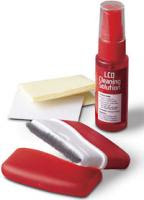
LCD Cleaner
Your LCD or CRT screen is probably with touch-print or worse yesterday’s pizza on it.
Use a commercial LCD screens cleaner that comes in a spray bottle and includes a special cloth for all my LCD monitors, LCD TVs, and laptop screens.

Follow these steps to safely clean your Computer Screen :-
a. Wipe the dust off the monitor with a soft, lint-free cloth.
b. Dampen a sponge or lint-free cloth with water. (Be sure to rinse out all the excess moisture.)
c. Rub the screen's surface gently. (Careful: Don't get any excess liquid on or inside the monitor.)
d. Let the monitor dry completely before closing the lid!
To help prevent the stains, consider storing the soft lint-free cloth that you use to clean the monitor inside the laptop, between the keyboard and screen.

Avoid using detergent that contains strong chemicals (acid or alkaline). Don't use abrasive powders.


Put a Shine on your mouse.

Use the same technique with your mouse, which you should clean on all sides. Mouse pick up a lot of gunk on their undersides, so just scrape off anything that's accumulated there. If you’re still using a non-optical mouse that uses a ball, open it up, clean off the ball with the damp towel, and use a Q-Tip to clean off the rollers inside. Alcohol works for rollers that are excessively dirty.


Dust Inside Computer.
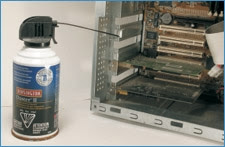
CPU
You use compressed air from a local hardware shop would do the trick. Dust-Off is a good brand, try getting a environment free compress air. Open up your PC's casing and take it outside if there's an excessive amount of dust. Give it a few quick blasts from the can with the goal of getting all the dust out of the CPU. Extended spraying is a no-no, as the air that comes out is quite cold and can cause condensation to build up on electronic parts if you hold down the spray button for too long. Use the nozzle straw attachment to get to hard-to-reach places like under the motherboard, CPU and small fans.


Clean your keyboards.

Use the straw attachment to clean out your keyboard and also a small brush. You could also use a mini-vacuum. Next you'll want to clean off the surface of the keyboard. Most are pretty tough, so you can use a regular household cleanser to do the job.

Don't spray 409 directly onto the keyboard, but lightly dampen a cleaning rag or paper towel with the 409 and wipe it down gently. You don't want liquid dripping between the keypads. You can use a Q-Tip moistened with alcohol to clean anything that has dripped down between the keys.


Please be sure to switch off the Computer unit before carrying out this practice. And don’t touch the PCB board’s with out grounding yourself, this may cause static and damaging the chips.
Tools might need:-

Compress Air Unit

Cleaning Kit