Tampilkan postingan dengan label laptop. Tampilkan semua postingan

Rabu, 17 November 2010

Lenovo 12.5 Inch IdeaPad U260 Laptop

Lenovo has added another ultra portable laptop to its range with the launch of the 12.5 inch IdeaPad U260. The Lenovo IdeaPad U260 features a 12.5 inch display, and as you can see from the photo it is designed to be portable, measuring just 0.71 inches thick and weighing in at 3.04lbs.

The Lenovo IdeaPad U260 comes with a choice of Intel ULVC Core i3 and Core i5 processors, there is also a four cell battery, two USB ports, and 4GB of RAM.
Lenovo-ideapad u260

Other specifications includes 320GB hard drive, integrated 801.22 b/g/n WiFi, VGA, HDMI. There are no details on pricing or a release date as yet.

Via Thinkpads

Rabu, 03 November 2010

Belkin Slim Back Pack

Compartments for everything from pens, business cards, credit cards, power supplies, and your other notebook accessories. Separate removable pouch for your power supply coordinates with your bag and contrasts for easy identifi cation. Belkin Slim Back Pack

The shoulder straps and backside of the slim Backpack have extra padding and breathable mesh for maximum support and comfort. Convenient headphone grommet provides access to your MP3 player while keeping it safe and stored in a secure pocket.

The Belkin Slim Back Pack is a lightweight, and versatile back pack that's designed to carry your laptop and everyday essentials. Designed to carry 15.4-inch laptops, this back pack also includes room for everything from pens, business cards, credit cards, power supplies, and your other notebook accessories.

With this back pack, you won't have to worry about transporting your laptop from your home to the cafe, or through the airport on your next business trip. Featuring a stylish black and light gray color combination, the Slim Back Pack is made with a durable polyester exterior and a plush Soft-Touch Lining that will protect your computer and essentials from the nicks and scratches that everyday life will throw at them. The pack can be easily hand washed with soap and water to keep it looking fresh.

For added convenience and versatility, the bag is designed with a separate removable pouch for your power supply that coordinates with your bag and contrasts for easy identification. The shoulder straps and backside of the pack each have extra padding and breathable mesh for maximum support and comfort. The Slim Back Pack even has a convenient headphone grommet that provides easy access to your MP3 player while keeping it safe and stored in a secure pocket while you're on the move.

The Belkin Slim Back Pack's exterior measures 18 x 12.5 x 5 inches, with its interior notebook compartment measuring 17 x 11.5 x 2 inches, providing your notebook with a snug and secure fit. It is backed by Belkin's Lifetime Warranty.

Price: $49.99 Click here to buy

Selasa, 04 Agustus 2009

MSI Wind Touch the ultimate PC Touch Screen

Gadget Junction - MSI Wind Touch AE1900
MSI Wind Touch is a touch screen PC housed in a monitor about the same size as 20 inch iMac.

This sleek touchscreen PC is a one stop shop all you need from web browsing, email, word processing and gaming. The menu for the MSI Wind Touch is simplistic in the most laudable ways.
you may select from Work, Tools, Fun and Web categories depending on what you want to do with it.

The icons are larger than you would find in the normal PC's so that you don't need to use your fingernails or a makeshift stylus to select functions and the responds time is just in miliseconds.

Gadget Junction - MSI Wind Touch AE1900 Gadget Junction - MSI Wind Touch AE1900 Gadget Junction - MSI Wind Touch AE1900

MSI wind Touch has four USB ports and also a four in one card reader. It runs on Microsoft Windows XP instead of Windows Vista but it's ready for windows 7 even with touchscreen capability.

Specification for MSI Wind AE1900.

Screen size : 18.5 inch
Resolutions : 1440 x 900 with 16:9 ratio for LCD
Storage : 160Gb / 2Gb maximum
Connectivity: 4 x USB, N Wi-Fi, Ethernet, 4 in one Card Reader, DVD Burner, 1.3Meb cam and Audio in/out.

Size: 476 x 365 x 49 mm

Gadget Junction - MSI Wind Touch AE1900 Gadget Junction - MSI Wind Touch AE1900


The MSI Wind Touch is a eco friendly as it consumes only 45watts power.

Kamis, 04 September 2008

Optimizing RAM for better performance of your computer

Having 1 or 2Gbytes of RAM may solve your memory problem for now but there’s always a time where you’ll be running more programs in future with your computer of laptop. After a while running on 2Gbyte of RAM it seems it’s not enough when you run more programs on your computer.


There is a simple solution on how you can optimize your RAM for better performance. By downloading RAMBooster.


RAMBooster monitors the amount of RAM your system is using and allows you to free it up. This will let your computer or laptop to run smoother and faster, and you won't have to reboot as often. It will monitor the memory at all times, and if the amount of free RAM gets too low, it will automatically boost it for you, finding unused RAM and returning it to the free pool. RAMBooster will also monitor your CPU usage.


>>RAMBooster Download<<


How to use RAMbooster.


  1. Download RAMBooster and install it on your computer
  2. Watch the video below on how to use RAMBooster


Laptop battery safety tip.

Millions of laptop was been recall back to their manufacture due to laptop battery that may cause risk of fire.

Most of laptop batteries are made of lithium ion based whereby ion that contains oxygen. Oxygen is the fuel for fire. If the laptop batteries are mistreated or poorly manufactured it may cause fire.

Tips for laptop battery.

  • Recall by manufacture for replacement of laptop battery.

  • Don’t let the laptop continuously charging even you’re not using it. If you felt hot from your battery immediately unplug the supply. If the battery is fully charge unplug the ac plug.

  • Treat the battery fragile.

  • Buy original battery as clone or refurbish battery may not be claimed under warranty or replacements.

Watch the video below as it explain how simple it’s handling the laptop battery.


Rabu, 16 Januari 2008

Apple Macbook Air Thinnest Notebook

Apple Macbook AirApple had released it’s most waited of the year Macbook Air Notebook. It’s really amazing to see a thinnest notebook around with full load of gadget. The Macbook Air Notebook is very light, fragile, and small in size.

Macbook Air Notebook may seen small and light but it has all the right things on it making it the Macbook so different from the rest of the notebook. The Macbook Air Notebook can be inserted into a normal document envelope as it’s so small and unique as part of it main devices install in it. With a silvery finish, the MacBook Air features a 13.3-inch LED-backlit widescreen display that has a 1280 x 800 pixel resolution. The backlighting saves power and provides "instant on" response from the moment you turn it on. The device has a slightly wedge-shaped profile. It weighs about 3 pounds, and a thickness of 0.16-0.76 inches. It's 12.8 inches wide and 8.95 inches deep.

Features a built-in iSight webcam and a full sized MacBook-style black keyboard. The keyboard is backlit, similar to MacBook Pros or Ipod, and has an ambient light sensor that automatically adjusts the brightness. The trackpad is also capable of recognizing multi-touch gestures, similar to using an iPhone or iPod touch. As a result, the MacBook Air's trackpad is proportionately large, compared to the size of trackpads found on the MacBook or MacBook Pro.

With a 1.8-inch hard disk drive with 80GB of storage capacity standard. A 64GB solid-state disk(SSD) drive is an optional. The hard drive is a Parallel ATA (PATA) model that operates at 4200 RPM. An Intel Core 2 Duo chips running at 1.6GHz, with 1.8GHz available as option powers for the laptop. It’s 60 percent smaller than others. The chip operates with 4MB of on-chip shared L2 cache running at full processor speed, and uses an 800MHz frontside bus. 2GB of 667MH DDR2 SDRAM is also included.

Like the MacBook and the MacBook Pro, the MacBook Air features a slimmed down MagSafe connector for power. It comes with a 45 watt power adapter. A flip-down door on one side reveals USB 2.0, Micro-DVI (to connect an external display) and a headphone jack. The MacBook Air also includes 802.11n-based wireless networking support and Bluetooth 2.1 + EDR.

Apple Macbook AirPretty amazing for a laptop and also to come back as the main player after the Apple Iphone. Most of the devices that had been incorporated inside Macbook Air is way smaller than the usual devices from Hard disk to the processor. Way to cool for a laptop.

This is the official ad for Macbook Air Notebook


The Official Release of Macbook Air Notebook

Rabu, 21 Maret 2007

Dust Free Computer

Most of just forget to clean our internal computer. One buys a computer and left it on a corner till it get dusty, dirty and oily. Even for gamers they just leave it rather then cleaning it, but for some just cleaning the outside is just to make the PC look new. Computers were designed to exhaust chip-damaging heat generated by the Power Supply unit, VGA Cards and CPU’s. Fans and vents, which were clogged with dust, will lead to overheating, erratic PC behavior, noisy computer, and even complete malfunction of the computer.

Computer Screen.
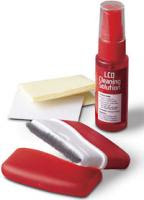
LCD Cleaner
Your LCD or CRT screen is probably with touch-print or worse yesterday’s pizza on it.
Use a commercial LCD screens cleaner that comes in a spray bottle and includes a special cloth for all my LCD monitors, LCD TVs, and laptop screens.

Follow these steps to safely clean your Computer Screen :-
a. Wipe the dust off the monitor with a soft, lint-free cloth.
b. Dampen a sponge or lint-free cloth with water. (Be sure to rinse out all the excess moisture.)
c. Rub the screen's surface gently. (Careful: Don't get any excess liquid on or inside the monitor.)
d. Let the monitor dry completely before closing the lid!
To help prevent the stains, consider storing the soft lint-free cloth that you use to clean the monitor inside the laptop, between the keyboard and screen.

Avoid using detergent that contains strong chemicals (acid or alkaline). Don't use abrasive powders.


Put a Shine on your mouse.

Use the same technique with your mouse, which you should clean on all sides. Mouse pick up a lot of gunk on their undersides, so just scrape off anything that's accumulated there. If you’re still using a non-optical mouse that uses a ball, open it up, clean off the ball with the damp towel, and use a Q-Tip to clean off the rollers inside. Alcohol works for rollers that are excessively dirty.


Dust Inside Computer.
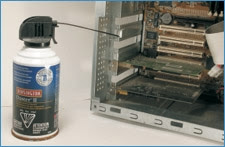
CPU
You use compressed air from a local hardware shop would do the trick. Dust-Off is a good brand, try getting a environment free compress air. Open up your PC's casing and take it outside if there's an excessive amount of dust. Give it a few quick blasts from the can with the goal of getting all the dust out of the CPU. Extended spraying is a no-no, as the air that comes out is quite cold and can cause condensation to build up on electronic parts if you hold down the spray button for too long. Use the nozzle straw attachment to get to hard-to-reach places like under the motherboard, CPU and small fans.


Clean your keyboards.

Use the straw attachment to clean out your keyboard and also a small brush. You could also use a mini-vacuum. Next you'll want to clean off the surface of the keyboard. Most are pretty tough, so you can use a regular household cleanser to do the job.

Don't spray 409 directly onto the keyboard, but lightly dampen a cleaning rag or paper towel with the 409 and wipe it down gently. You don't want liquid dripping between the keypads. You can use a Q-Tip moistened with alcohol to clean anything that has dripped down between the keys.


Please be sure to switch off the Computer unit before carrying out this practice. And don’t touch the PCB board’s with out grounding yourself, this may cause static and damaging the chips.
Tools might need:-

Compress Air Unit

Cleaning Kit

Minggu, 10 Desember 2006

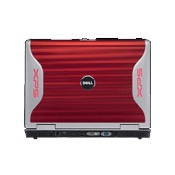
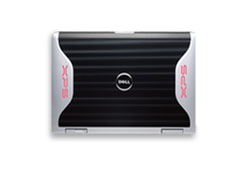
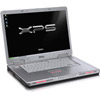
Dell XPS M1710

Dell XPS M1710

A perfect laptop for the gamer's who loves a new breed of technology that will make you want it. Comes with latest graphic card to run smoth most newest games. I also comes in variety of red cover which made it look like awsome gadget.

Absolute Control Over Multimedia
Offering photo editing, video management, access to online content providers, optional external TV tuner2, DVD playing and more, Media Center helps you turn your notebook into a complete audio/visual and gamer solution.

Dell XPS M1710

D' specs:-
Processor: Intel® CoreTM 2 Duo Processor T7600 (2.33GHz, 4M L2 Cache, 667MHz FSB)

Operating system: Genuine Windows® XP Professional
Genuine Windows® XP Home Edition

Memory: Up to 4GB of Dual Channel 667MHz DDR2 memory provides blazing performance. DDR2 667MHz dual channel memory offers excellent performance and bandwidth. This memory architecture is designed to help improve the overall system performance and reduce power consumption.

Graphic and Display:
17" Wide-Aspect UltraSharpTM TFT Active Matrix WUXGA (1920x1200) display with TrueLifeTM . 256MB NVIDIA® GeForce® Go 7900 GS Graphics Card.

Wireless:
The high-performance computing without being tied down. The XPS M1710 offers the Intel® Pro/Wireless 3945 wireless card, giving you instant access to the Web for surfing, e-mail, chat, gaming and more.

The laptop also offers next generation Wi-Fi:
Optional Dell Wireless 1500 Draft 802.11n Wireless Mini-Card - plus Draft 11n routers with Intensi-fiTM technology -it can go up to 5 times faster and get twice the range of 802.11g.

A really state of the art gadget for gamer and those who love's technology.


Tags
Technorati /