Tampilkan postingan dengan label Software tips. Tampilkan semua postingan

Minggu, 25 Oktober 2009

Why defragment your computer?

We always forget to defragment of the computer. But why we must defrag over the time over and aover again. Does it really help solves our computer problem's. Some do say it does but some just format's the whole computer.

But by defraging the computer informations it does help the computer to perform better in future. Defragmenting, also referred as "defragging," reorganizes the hard drive by putting pieces of related data back together so that files are organized in a contiguous fashion.

As a result, the computer system can access files more efficiently. By efficiently organizing files and folders, defragmenting will leave the computer's free space in one piece. This will allow the new files to be saved in an orderly fashion, thereby reducing the need for future defragmentation.

As the overall size of hard drive keeps increasing, defragmenting a computer regularly may even help to increase its life-span. A system needs to work quite hard in order to collect fragmented of information across larger disks. Considering the amount of work this takes, it seems likely that defragmenting can help a hard drive last significantly longer and efficeintly.

Though some computer experts argue that today's operating systems are efficient enough to eliminate the need for defragmenting It is generally recommended that computer users defrag their systems on a regular basis. Average users will probably find that bimonthly defragmenting produces sufficient results. Users who notice a frequent loss of efficiency and speed may choose to defrag more often.

But with windows defragment it takes ages to complete a cycle but another reliable program that can do it in a nick of time even you have a larger hard drives, smart defrag it's easy as you can spell it name.

Benefit's

1. Extremely Easy to Use
Install it and forget it. This powerful, free defragmenter works continuously, automatically and quietly in the background on your PC. Its intuitive interface makes Smart Defrag the ideal utility for complete computer dummies.

2. Exceptionally Efficient Defragmentation
Smart Defrag has the world’s fastest defragmenting engine. It’s been specially designed for modern, large hard drives, so it eliminates long waiting times.

3. Optimize Disk Performance
Smart Defrag doesn’t just use simple defragmentation. It also streamlines your file system, places the frequently used files and directories into the fastest area of the disk, enabling your computer to run at top speed with the most stability.

4. Always-on to Work Automatically
Smart Defrag works automatically and quietly in the background, so it continually and constantly keeps your computer fragment-free.

5. Data Safe and Reliability Guaranteed
Smart Defrag uses the commercial-level standard to move data and does not damage any file in your disk. Besides, unlike other "Automated" Defragmenters, Smart Defrag does NOT constantly perform analysis and defragment, which does damage your hard drive and shorten its life. Smart Defrag has a "Safe Intelligence" technology that can assure the health of your disk by deciding When and How to start defragmentation.

Free Defragmenter Forever
Smart Defrag is 100% freeware. Download, use, and update it absolutely free for your personal computers, business or enterprise servers –– it won’t cost you a penny.

Designed for Windows® Vista™, XP, 2000. and Windows® 7

Download a copy and try it (FREE)

Sabtu, 24 Oktober 2009

IOBit Top 5 reasons why only the IT Professionals Using it.

IObit Security 360 is an advanced malware & spyware removal utility that detects, removes the deepest infections, and protects your PC from various of potential spyware, adware, trojans, keyloggers, bots, worms, and hijackers. With the unique "Dual-Core" engine and the heuristic malware detection, IObit Security 360 detects the most complex and deepest spyware and malware in a very fast and efficient way. IObit Security 360 has a real-time
malware protection and frequent updating for prevention of zero-day security threats.

Designed for Windows® 7, Vista™, XP and 2000 (32bit and 64bit), IObit Security 360 can work with your Antivirus along side for a superior PC security.

Top 5 reasons why you should choose IObit:
  1. IObit products will effectively keep your PC safe, error-free, and running at top speed! After all, aren't these the things that you care about the most?
  2. IObit and its product developers are often recommended by IT experts and editors around the world as clearly being amongst the world's top suppliers of quality Windows utilities programs.
  3. IObit unique design ideas and technologies make IObit products easier, more efficient, and effective.
  4. They had over 35,000,000 downloads since 2006 - 98% of those users would recommend IObit to a friend.
  5. IObit is trusted and recognized by most companies and organizations around the world for it's realibity.
Most of their products are 100% freebies. with full updates and protections and like other will always put you on hold until you had made the payment.

FREE Download
IObit Security 360

Minggu, 30 November 2008

Portable Hard Drive in style.

Gadget-Junction : eGo Leather Portable Hard DriveThe are many way’s you want to take along your data’s. But can you do it with style? Well at eGo Leather portable hard drive do come in style. Portable Hard drive from Iomega wraps in brown leather around 250Gb to 1Tb of storage so your files may traveler in style.

eGo Leather Portable Hard Drive does not requires any external power supply to power the unit as it’s uses USB port from the computer to power up the Portable Hard Drive.

eGo Leather Portable Hard Drive weights half pounds and it’s less than 6 inch long. It works both Windows and Mac operated system. You may want to use backup software for the Portable Hard Drive from EMC Restrospect as it’s FREE. Free Download of EMC Restrospect works both Windows and Mac.

eGo Leather Portable Hard Drive features Iomega DropGuard technology, which is intended to protect the device and it’s data from accidental drop of up 51inch.

If you’re not into leather you may want to check Iomega offers version of the eGo drive in metallic red, blue, black, pink, silver and also woodland camouflage.

Rabu, 17 September 2008

Buying GPS unit.

GPS
There are thing that you might want to know before you’re buying a GPS. Most popular use is to get turn-by-turn directions while driving from point A to point B. Some popular car navigational units are the Magellan Roadmates, the Tomtom, the Garmin Nuvi units, and the new Navigon gps units.


1 - Screen Size and sound are important. Especially while driving. The screen should be readable and bright, also make sure the buttons are big enough for your fingers, so that you aren't pressing multiple buttons at the same time while driving. Vehicles are noisier than you may think. Driving noise can make it difficult to hear weak audio. Be sure to check out the sound quality to make sure you can understand what is being said by the GPS unit. It should be clear and loud so that you can hear it in your vehicle.


2 - Downloadable Maps and memory. Most GPS units come with built in maps. A lot of them can be downloaded as well. It is a good idea to purchase one that has the ability to download updated maps, so that you map doesn't get outdated.


Memory - the more memory the GPS unit has, the more locations, waypoints, landmarks, and maps you can save onto it. Make sure the memory size of the GPS can be expandable as graphic eats more memory.


3 - The time it takes a GPS to find and display information. This depends on the number of channels a GPS unit has. The more channels the unit has the better the reception is. Take this into consideration. You don't want to have to pull over and wait for it to get map data if you make a wrong turn.


4 - Does the unit speak street names? This is very helpful. If it does not say the street names and it tells you to turn right. You may have to glance at the unit to check the street name. This can be dangerous.


5 - What type of batteries are being used with the GPS unit? Are they normal rechargeable AA batteries or are they special manufacturer batteries? Also how long do they last.


6 - Bluetooth is great for those who need to use cell phones while driving, With Bluetooth the driver can make and receive hands-free calls through the unit's speaker and microphone, and view their telephone book and access caller ID on the screen. What an amazing feature. Of course blue-tooth enabled units are little more expensive.


Those are the six things you need to know before you buy a GPS unit. All Magellan Garmin and NAVIGON GPS units uses NAVTEQ mapping data, while TomTom uses Tele Atlas. I've done research online and found that both NAVTEQ and Tele Atlas are both good and I would not base my decision on which mapping data the gps uses.

Kamis, 04 September 2008

Optimizing RAM for better performance of your computer

Having 1 or 2Gbytes of RAM may solve your memory problem for now but there’s always a time where you’ll be running more programs in future with your computer of laptop. After a while running on 2Gbyte of RAM it seems it’s not enough when you run more programs on your computer.


There is a simple solution on how you can optimize your RAM for better performance. By downloading RAMBooster.


RAMBooster monitors the amount of RAM your system is using and allows you to free it up. This will let your computer or laptop to run smoother and faster, and you won't have to reboot as often. It will monitor the memory at all times, and if the amount of free RAM gets too low, it will automatically boost it for you, finding unused RAM and returning it to the free pool. RAMBooster will also monitor your CPU usage.


>>RAMBooster Download<<


How to use RAMbooster.


  1. Download RAMBooster and install it on your computer
  2. Watch the video below on how to use RAMBooster


Senin, 04 Agustus 2008

Creating an hidden Operating system

Developed by truecrypt that allows you to create hidden operating system which the existence will be impossible to be proved. Why would you use a hidden operating system. If you're computer is been access by someone they will be looking on the wrong operating system and it will help you keep safe your private document's.

If you're sharing a computer and you might don't want them to share's common files or private document's without them knowing that you have another operating system hidden in the computer. Truecyrpt allows you to hide a operating system in a partition.

Truecyrpt allows you to create another partion under NTFS x2.1 or Fat32 (4Gb) of storage on hard drive. Partition the hard drive and open truecrypt. Select option system on truecrypt select creates hidden operating system. Follow on screen instruction of truecrypt.

Watch the video from Cnet that shows how it's done with truecrypt.org


Click here for Truecrypt

Minggu, 27 Juli 2008

Multi chat application for iPhone and iPod touch.

Every one is eager to get their hand on chatting as it’s a way to pass time with your friends via chat. But if you’re out and you have a iPhone then that is all you need to start chat with your friend. But what if you wanted to chat via yahoo, jabber, googletalk, aol, msn or even icq. There’s a function in iPohone and also for iPod touch which enables user to use multi-chat option.

Well there a trick that that you may perform with your iPhone or iPod touch. Watch the video below and turn on your chatting experience in a new way.

Rabu, 02 Juli 2008

Video Editing Software with Pinnacle Studio.

The latest version of video editing software available in the market and yet with more than we had bargain for. The Pinnacle Studio 12 features animated text and bright graphics and can play multiple clips simultaneously. Comes with 80 templates that makes up 11 themes to perk with those home productions.

It comes in 3 version which is Pinnacle Studio, Pinnacle Studio Plus and Pinnacle Studio Ultimate. The video editing software works with Windows Xp and Vista. The Pinnacle Studio Plus and Ultimate capable of burn to Blu- ray disc.

The three Pinnacles editions offers direct web uploading to release the finished video quickly to Youtube.

Click on the banner below to learn about The Pinnacle Studio 12

Studio Ultimate Edition


Would like to buy it - 10% off

10% Off Pinnacle Studio Ultimate with code 12STUL10 . Powerful video editing including powerful film FX and plugins.

Selasa, 01 Juli 2008

Got Firefox 3 add on bookmark synchronizer.

FireFox 3 Running Firefox 3 on multiple computer maybe hassle when it comes to bookmarking all you favorite websites. Try using Firefox Add on called Foxmarks.

Foxmarks allows you to synch all your bookmarks across different computers with one simple interface. Just install Foxmarks on each and every computers that you usually use and it will keep your bookmark synchronized.

Even better when running on Firefox you also can login to your account on foxmark (my.foxmarks.com) to manage your bookmarks from any computer.

Where to find Foxmark, Foxmarks Add-on

Mozilla Firefox 3 – Download here! or click on the image below.

FireFox 3 Bookmark Synchronizer

Minggu, 08 Juni 2008

Cleaning a laptop.

We do have laptop instead of a desktop because it can go anywhere and it light in weight. But do we care if our laptop is clean or not? Sometimes we can find food particles on them even worse spill of drinks and yesterdays pizza on the keyboard.

Is it cleaning a laptop is hard work. Let’s see what we can do to make it a better companion rather than leaving it to the insects. Laptops are very sensitive equipment as they are very easily been damaged nor faulty as they are not made for rugged used as many think. Cleaning it may take only few steps and easily done with simple yet effective with just household items.

Jumat, 06 Juni 2008

Does USB 2.0 & USB 1.1 work interchangeably?

You may have heard that USB 2.0 is "backward-compatible" with USB 1.0/1.1 (Full-Speed USB). We’ll that's true, USB 1.1 is also forward-compatible with USB 2.0. Whenever a system has USB 2.0 ports, you'll find the "Enhanced" USB controller in Device Manager, but you will also find two other USB controllers. These two to maintain backward compatibility to USB 1.1 devices. Each USB 2.0 host actually has 3 chips onboard. The USB controller routes signals to the correct controller chip depending on how a device is recognized. Where a device is physically plugged in has no bearing on how it is routed. All ports on a USB 2.0 motherboard can host any USB devices at all as long as the system and devices are healthy.

The vast majority of USB 2.0 devices will work on older PCs and Macs. None should flat-out fail unless there are other issues with the system. Hi-Speed USB devices will revert to Full-Speed operation when connected this way. Understand that Hi-Speed is at least ten times faster than Full-Speed in actual operation, so the speed difference is quite noticeable - unless you have never experienced Hi-Speed, of course.

When it comes to USB hub compatibility between USB 2.0 and USB 1.1, here some facts: · A powered hub is always preferable to unpowered.
  1. USB hub ports are not as capable or flexible as real PC ports so it's best not to expect the world of them.
  2. USB 1.1 (obsolete) hubs will work fine on USB 2.0 ports, but they cannot utilize USB 2.0 capabilities. They will default to slower speeds.
  3. Hi-Speed and Full/Low-Speed USB devices can coexist nicely on USB 2.0 hubs. Connecting such a hub to a USB 2.0 port is recommended.
  4. USB 2.0 hubs can be used on older USB 1.1 computers.
  5. Although it is said that you can "cascade" up to 4 hubs, problems may start to arise after two hubs, it's best to minimize hub usage if possible.
  6. Many USB devices don't work well on hubs. Cameras, scanners and especially USB drives are known to have problems with hub connectivity. Remember that "active USB extensions" are really just one-port hubs.

How to troubleshoot USB "unknown device" error in Device Manager?

The USB usually comes in with different software for the adding the device onto a computer. But usually it will indicate that the device install in not working properly or unknown devices. To solve this problem with USB port just follow the tips stated below:
  • The USB device or the USB adapter requires its own power source. If your USB device or adapter came with an AC power "brick", try re-connecting it.
  • Here's a likely one - the front USB ports on your PC case may be misconnected. We have seen them that way from the factory. It's a good idea to check the connections against specifications. The standard order of connection is Red, White, Green, and Black. No more than 4 wires per USB bank are needed.
  • Defective device. Do not assume that all PC components work correctly out of the box. I've seen many new USB devices that do not work. If you can, try the device on another PC.
  • All drivers are not installed. Some devices will require installing the driver package before plugging in the device. Some devices will also require basic USB files from the Windows CD before the unit will function. The general rule is to always follow installation directions precisely and to have the Windows CD ready.

Hope this short USB problem solving method will help. but if you know other ways to tweak the USB care to drop a comment below.

Kamis, 03 April 2008

Protecting your Mobile Phone from viruses.

mobile phone virusThe following tips can help prevent problems with viruses on your phone:

1. Switch to Bluetooth hidden mode. If your phone has Bluetooth capability, ensure that the Bluetooth capability is switched to hidden or invisible mode unless you specifically need it to be visible. This will help prevent other Bluetooth-enabled devices from finding your phone (unless you grant them the necessary permission) and will therefore help protect your phone from worms that spread using the Bluetooth wireless technology.

2. Exercise caution before opening attachments. When accepting applications sent via Bluetooth, or opening MMS attachments, exercise caution, just as you would when opening an email attachment on your PC, because they may include harmful software. Ensure the application or attachment comes from a known source, and is wary of opening files that have unfamiliar text attached to them, even if they come from someone you know.

3. Only download content from a trusted source. Trusted sources may include operator portals and other well-known brands that offer adequate protection against viruses and other harmful software. Be aware though that, as with emails, malicious or fraudulent users may be able to fake the appearance of a trusted source.

4. Consider anti-virus software. Some software is available to prevent phone viruses. You may wish to consider downloading this software.

5. Contact your phone manufacturer if concerned. If you think you have a virus, call the phone manufacturer's care line. They can assist you confirm if it is a virus, and help fix the problem.

Disable start-up on Window XP

Constantly running in the background of Windows XP are services--processes that help the operating system run or that provide support to applications. Many of these services launch automatically at start-up. While you need many of them, some are not required, and they can slow down your system when they run in the background.

You can disable the windows services at start-up by using the system configuration utility, similar to the way that you halt programs from running at start-up, except that you use the Services tab instead of the Startup tab. But the system configuration utility doesn't necessarily list every service that launches on windows start-up. A bigger problem is that disabling services is more of shot in the dark than disabling programs. When you disable a program, you can get a sense of what the program does. But when you disable a service through the system configuration utility, there's often no way to know what it does.

· A better way of disabling services at start-up is via the Windows XP Services computer-management console. Run it by typing services.msc at the command prompt. The Services computer-management console includes a description of all services so that you can know ahead of time whether a particular service is one you want to turn off. It also lets you pause the service so that you can test your machine and see whether that service is needed.

· After you run the console, click the Extended tab. This view will show you a description of each service in the left pane when you highlight the service. The Startup Type column shows you which services launch on start-up--any with Automatic in that field. Click that column to sort together all the services that automatically launch on start-up. Then highlight each of those services and read the descriptions.

· When you find a service you want to disable, right-click it and choose Properties. In the Properties dialog box that appears, choose Manual from the Startup Type drop-down list. The service won't start automatically from now on, but you can start it manually via the console. If you want the service disabled so that it can't be run, choose Disabled. To test the results, turn off any services that you don't want to run by clicking Stop The Service in the left pane, or by right-clicking the service and choosing Stop.

Here is a list of some common services you might want to stop from running at start-up.


Portable Media Serial Number - Retrieves the serial number of a portable music player attached to your PC.

Task Scheduler - Schedules unattended tasks to be run. If you don't schedule any unattended tasks, turn it off.

Uninterruptible Power Supply- Manages an Uninterruptible Power Supply (UPS) connected to your PC.

Automatic Updates - Automatically checks for Windows updates. (You can check manually by going to http://windowsupdate.microsoft.com/.)

Telnet (service available on XP Pro only) - Allows a remote user to log in to your computer and run programs. (This will not be found on all versions of XP Pro.)

Wireless Zero Configuration Service - Automatically configures a Wi-Fi (802.11) network card. Disable this only if you're not using a Wi-Fi network card.

Senin, 18 Februari 2008

Reverse Cell Phone Detective

Reverse Cell Phone DetectiveWe have all received phone calls from numbers that we did not recognize. Sometimes you may miss calls, and you want to speak to the person again. Sometimes you may want to figure out how to make sure they never call you again.

No matter why you want to know more information about the call, you can use reverse cell phone lookup on ReversePhoneDetective.com to find what you want to know.

Why do a Reverse Cell Phone Lookup?

With a reverse cell phone lookup, you’ll be able to find at least the name and address of the person calling you which means you can find other ways of contacting them if necessary. That means you can also find answers if you’re worried about a cheating spouse, a prank caller, and more.

While a reverse cell phone lookup can be beneficial in many ways, to really reap the benefits, you need to select a service to use carefully. Free reverse phone lookup services will provide you the information you need, but they aren’t good for anything other than landline numbers. You won’t be able to find out anything about cell phone or unlisted numbers, and that leaves out lots of possibilities.

Is Free Really Free?

Instead, you should consider using ReversePhoneDetective.com. When you use the site, you will actually be able to perform reverse cell phone lookups because they actually do have directories that include mobile phone numbers. You won’t find mobile numbers at free sites, because these mobile directories have to be assembled manually - and that’s a very time-consuming and expensive process.

If you’re getting prank calls or if you find a number on you caller identification that you don’t recognize, you probably want to find out who is behind that number. The good news is that finding the owner of a phone number is easier than you might think with Reverse Phone Detective!

As long as you have the area code and the seven-digit number, you should be able to locate any number’s owner, if you know where to look.

Your first stop should be a free reverse phone number directory. Plenty of them are available on the Internet. At the site, you’ll enter the entire number including the area code and hit "Search." If the number is a published landline, you should get the information you want, including the name of the owner and the entire address of the owner.

If you’re lucky enough to get results, then your search can stop there. In most cases, you’ll need to try a slightly different approach.

Usually, the reason you’ll run into problems is that the number belongs to a cell phone. Because there is no central database of cell phone numbers, free reverse phone directories cannot return information on those numbers. You also won’t be able to get information on landline numbers that are unlisted or non-published.

Don’t bother trying multiple reverse phone directories in order to find the owner of a phone number, either. Most use the same databases, so if you don’t score results at one then you won’t fare any better at another site.

To recoup the costs involved, fees have to be charged. Landline numbers, on the other hand, are freely available in the public domain and are simple to collect and organize in a directory.

Sign up and complete your registration. At Reverse Phone Detective, the registration process is very straightforward and quick. Once you’ve taken care of the details, all you need to do to start your reverse cell phone lookup is enter the number, including both the area code and the seven digit number. When you hit "Search," the system will start to match your number with one of the millions of records in the ReversePhoneDetective.com database.

In seconds, you’ll have your results, along with access to expand people search databases. One of the best things about using ReversePhoneDetective.com is that we offer customers a 100% guarantee – you get results, or you don’t pay. It’s as simple as that!

The bottom line is that by picking the right service for your reverse cell phone lookup – ReversePhoneDetective.com - you’ll end up finding the information you want, and get more than you bargained for in the deal.

Give It A TRY:-

Reverse Cell Phone Detective

Ex No: 555-555-5555


Kamis, 06 Desember 2007

Security on the move on Wi-Fi

Wi-Fi makes your computer's resources available to users around you. On your home network you may not be too bothered about this, but outside the home this is an important consideration. Here's how to keep your system secure while on the road:

Wi-Fi Wi-Fi

  • Make sure each PC has up-to-date antivirus and firewall software.

  • Always carefully consider whether important personal or work information should be stored on a laptop, as they are particularly vulnerable to theft.

  • Secure any personal information, banking or credit card details. Software such as Password Safe (available free to download) will encrypt all passwords so you need remember only one password.

  • If you’re using a wireless laptop to connect away from home, such as a Wi-Fi access point, you may find that you’ll see a lot more computers in your workgroup because everyone is running under the default name MSHOME.' Remember anyone else would be able to see your shared documents, so changing your workgroup will keep out the curious and the opportunists, but it won't keep out the determined, so you may wish to remove documents from your shared documents before going out!

Download Password Safe for FREE

Minggu, 07 Oktober 2007

Be extra careful when DELETING Programs

Extra careful should be practice when uninstalling programs from your computer. Software can replace files that are used by other program, when software’s are removed, all files could be deleted, and including those was used by other application/program.

Some program/software may not be working. If during uninstalling, you receive a warning that some files may be used by other application, choose not to delete those files unless you know that they will not be used anymore.

Selasa, 18 September 2007

Extend battery life for Vista Notebook.

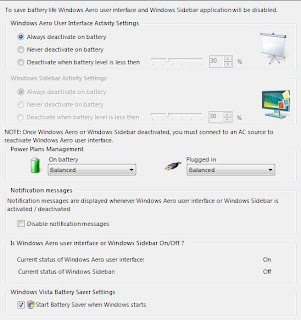
Laptops are pre-installed with window vista when you first purchase it. If you’re trying to save some extra minutes or even hours out of your battery, the vista Battery Saver may just be what you are looking for.
Vista
Vista Battery Saver is your save the application that actually switch off some of vista unnecessary energy hogs (Aero and Windows Sidebar) and re-enables the applications once you have plug your notebook back into a power socket.

Selasa, 04 September 2007

The end of Win Xp.

Microsoft Xp As well know, once Microsoft releases a new brand, The old brand will be in terminated as Win 95, Window 2000, Window Me and any other know Microsoft software will be replaced with a new breeds of operating system that is more compatible and even better features.

Microsoft is putting all it’s effort on marketing the all new Vista, but still Window Xp has it’s own popularity in the market.

Currently Microsoft is working on third service pack for Xp, which is planned to be released first half of 2008. Where else on it’s site Microsoft Support, Microsoft says that "mainstream support" for Xp Home Edition will be continued developing for security fixes and other patches will be ending on April 14, 2009.

The Extend Support will only be release for security updates by end April 8, 2014.

Microsoft Vista

Kamis, 30 Agustus 2007

Fusing Windows on your MAC OS X

VM WareVMWARE has released a fusion for Mac OS X, Desktop visualization environment that allows user to run up to 60 different types of x86 based operating system including windows and other OS on any apple Mac powered by intel processor.

Like most visualization and emulation, VMware Fusions allows booting up and running additional operation system within Mac OS X. If the user requires using Windows they don’t even have to deal with windows operating system. The Fusion has a feature called Unity that allows user to launch and run Window application as if they were native Mac Os X application.

Max Os XUnity only works on Vista and Xp. If the user requires using any other operating system they’ll have to run within windows in Mac Os X or in full screen mode. Fusion allows copying and pasting between it’s guest operating system, Mac Os X and it has extensive peripheral, power management and networking. The only desktop that allows 64 bit operating system, 8Gb of allocated memory per virtual machine and provides full multicore support.

vmware.com for Mac & Win